

Description
LivQ AccessFix – EAA & A11y AutoFix applies WCAG 2.2 AA and European Accessibility Act (EAA) remediations automatically, intercepting the full rendered HTML via PHP output buffering before it reaches the browser – not after, not via JavaScript overlay.
Every module can be independently enabled or disabled from Settings LivQ AccessFix.
Why server-side matters
JS-based accessibility overlays (widgets, injected scripts) patch the DOM after the browser renders it. The original HTML – the one Google indexes, axe-core audits, and screen readers without JS see – remains unmodified. LivQ AccessFix fixes the source HTML itself, so the correction is real, not cosmetic.
Frontend Modules
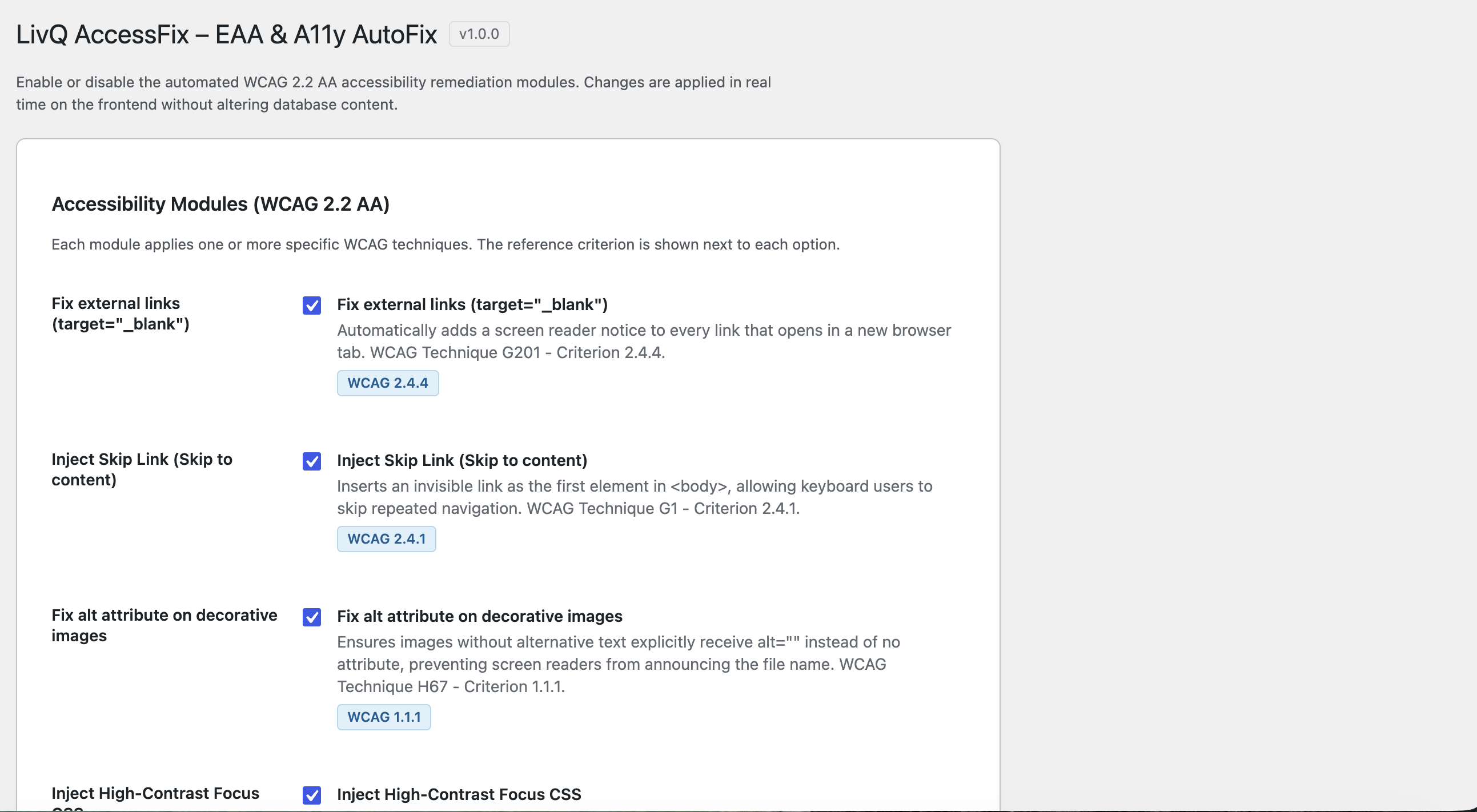
External Link Labelling (WCAG 2.4.4)
Intercepts the entire rendered page via PHP output buffer and appends a visually-hidden screen-reader notice to every <a target="_blank"> link. Also merges rel="noopener noreferrer" into existing rel values to prevent reverse tab-napping. Covers links generated by theme PHP, social share plugins, widget areas – not just the_content.
Skip Navigation Link (WCAG 2.4.1)
Injects a skip link as the first focusable element after <body> via wp_body_open. Target ID is configurable and auto-detectable from the admin. Visually hidden until focused.
Decorative Image Alt Fix (WCAG 1.1.1)
Ensures images without meaningful alt text carry an explicit alt="" via wp_get_attachment_image_attributes. Also hooks render_block_core/image to fix images in Full Site Editor templates and block themes where the attachment filter does not fire.
High-Contrast Focus CSS (WCAG 2.4.11)
Injects a focus-visible rule (3 px solid #0056b3 + glow) as inline CSS, overriding common theme patterns of outline: none without modifying any theme file.
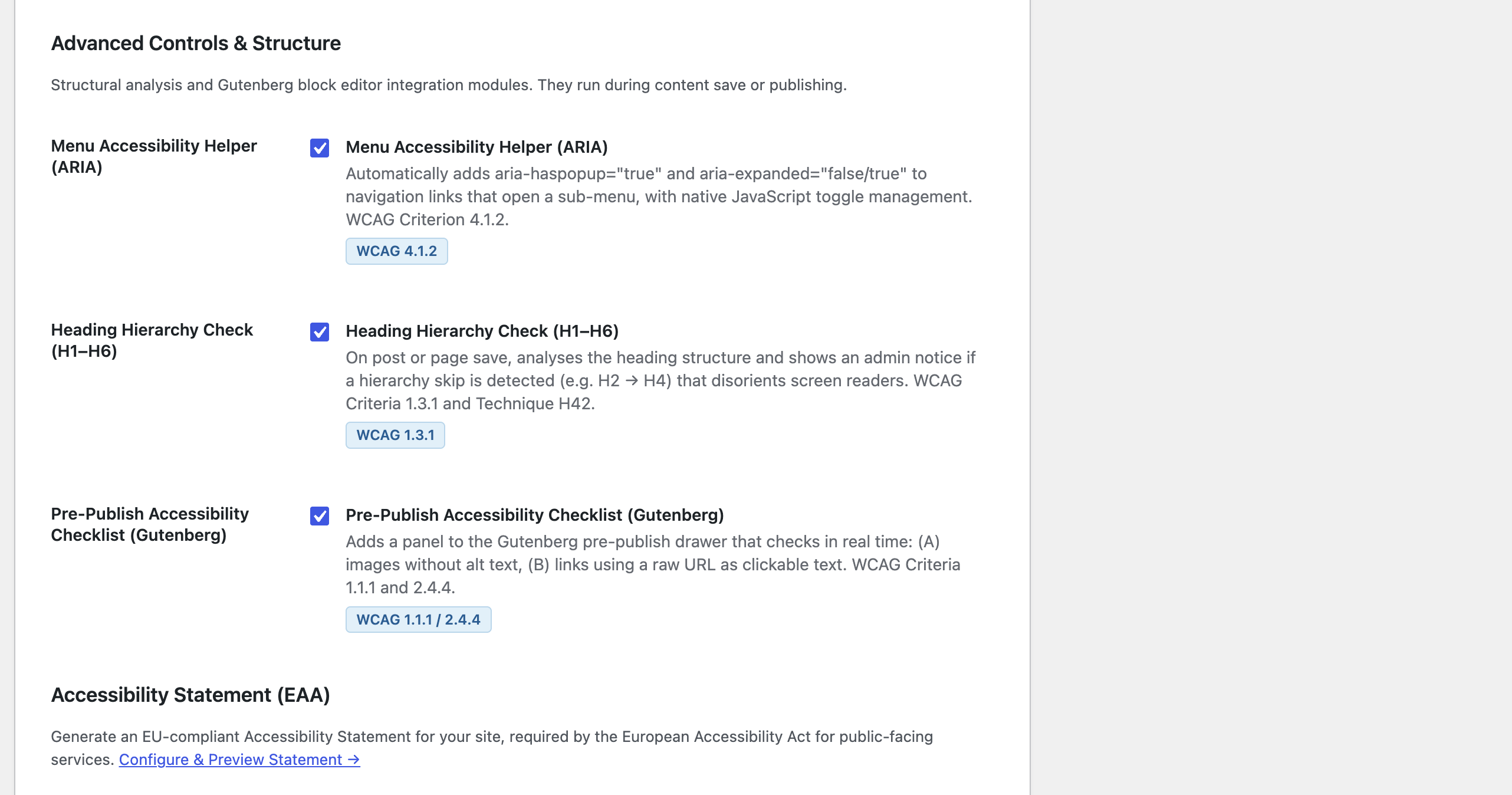
Menu Accessibility Helper (WCAG 4.1.2)
Adds aria-haspopup="true" and aria-expanded="false/true" to navigation links that control sub-menus, with a small Vanilla JS event handler (no jQuery) toggling state on click, Enter, Space, and Escape.
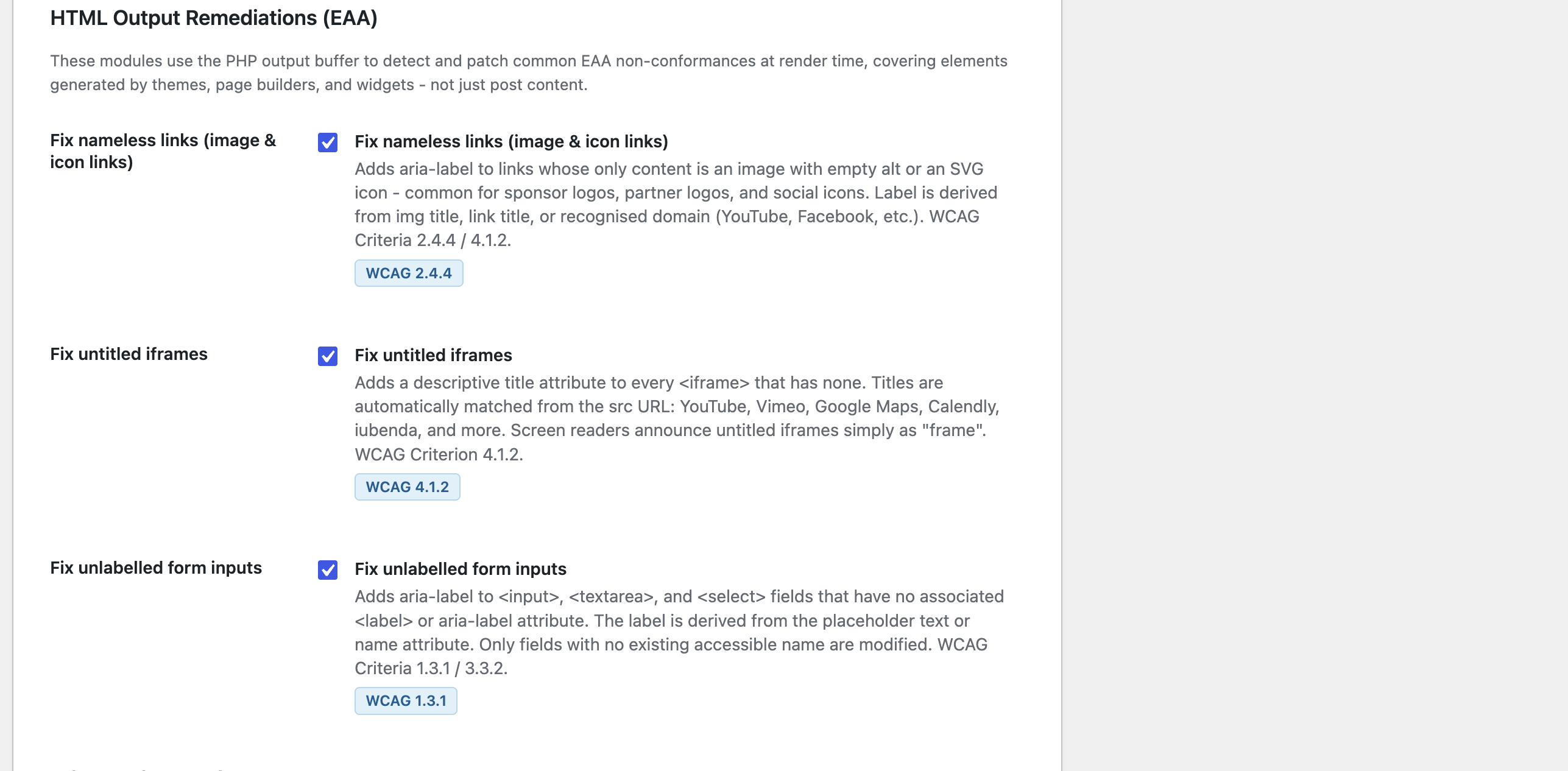
HTML Output Remediations (EAA)
Nameless Link Fix (WCAG 2.4.4 / 4.1.2)
Detects links whose only content is an image with empty alt or an SVG icon – a pattern ubiquitous in sponsor logos, partner logos, and social media icon rows. Automatically derives aria-label from: img title, link title, recognised social domain (Facebook, Instagram, YouTube, LinkedIn, and more), or the capitalised hostname as a final fallback.
Iframe Title Fix (WCAG 4.1.2)
Adds a title attribute to every <iframe> that lacks one. Titles are matched from the src domain: YouTube, Vimeo, Google Maps, Calendly, iubenda, Spotify, PayPal, Google Forms, and others. Screen readers announce untitled iframes as simply “frame” – this fix eliminates that.
Form Input Label Fix (WCAG 1.3.1 / 3.3.2)
Adds aria-label to <input>, <textarea>, and <select> elements that have no associated <label> element and no existing aria-label or aria-labelledby. The label is derived from the placeholder text or name attribute. Fields already correctly labelled are never touched.
Content Analysis Modules
Heading Hierarchy Checker (WCAG 1.3.1)
On save_post, scans heading levels in post content and detects skips (e.g. H2 H4). Issues are persisted as _livqacea_a11y_issues post meta (JSON with type, WCAG criterion, and timestamp) and displayed as an admin notice on the edit screen.
Pre-Publish Accessibility Checklist (Gutenberg)
Adds a panel to the Gutenberg pre-publish drawer with real-time checks: (A) Core Image blocks with empty alt text, (B) paragraph links using a raw URL as visible text. No AJAX. WCAG 1.1.1 / 2.4.4.
Compliance Tools
Accessibility Scanner
Scan key page types (homepage, blog index, single posts, pages, category archives, search results, 404) for WCAG violations. Each run produces a severity-scored issue list (Critical / High / Warning) with per-criterion detail. Results are cached and cleared on demand. WooCommerce page types (shop, product, cart, checkout, my account, product category) are detected automatically if WooCommerce is active.
Accessibility Issues Log
Admin page listing all posts with a persisted accessibility issue, with a nonce-protected CSV export (BOM included for Excel UTF-8 compatibility). Provides an audit trail for EAA compliance reviews.
Contrast Checker
Real-time WCAG 2.1 colour contrast analyser built into the admin. Evaluates foreground/background pairs against three WCAG criteria: Normal text AA (4.5:1), Large text AA (3:1), and UI components / graphics (3:1, WCAG 1.4.11). Includes a quick-test palette with common colour pairs.
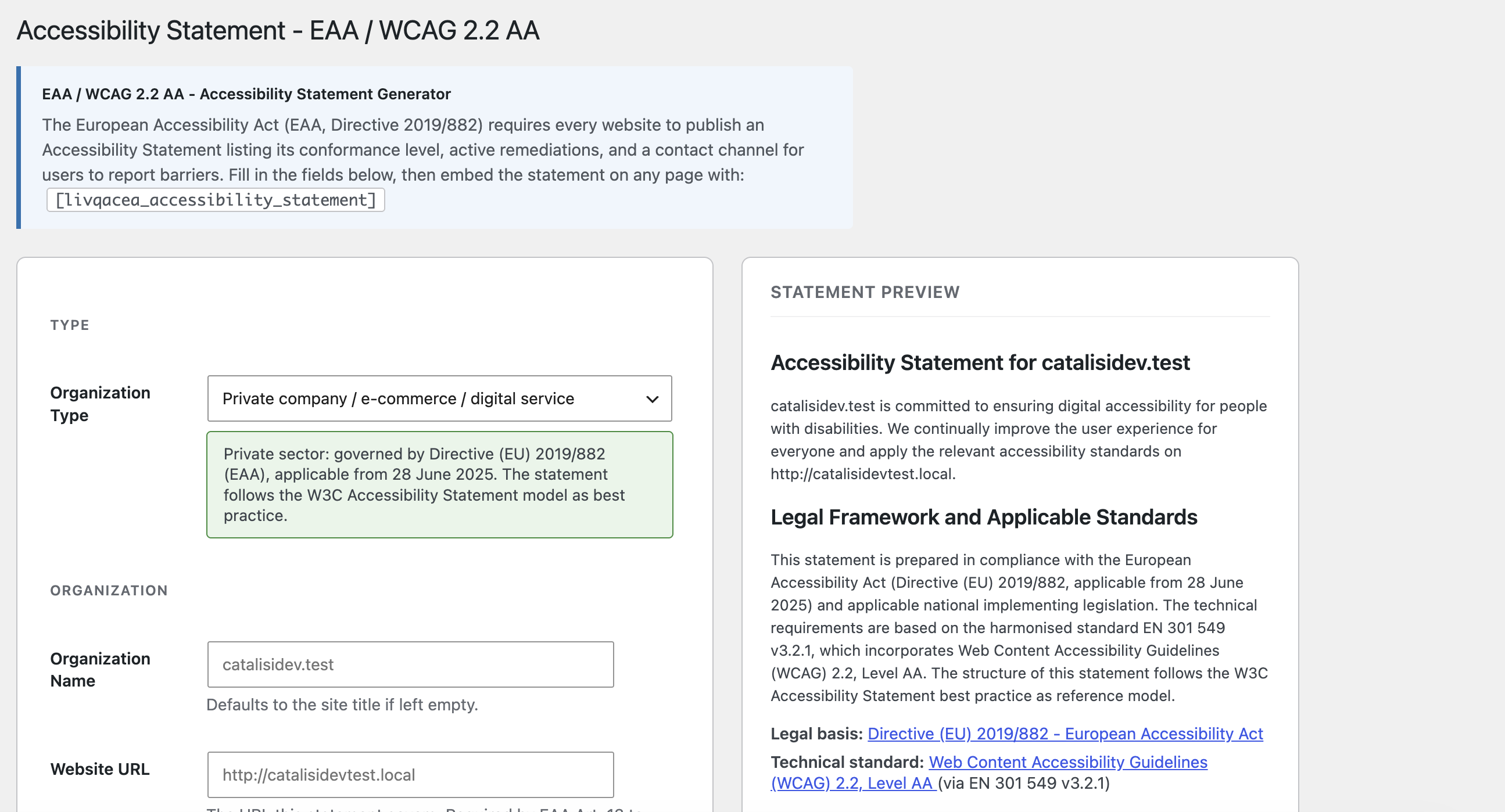
Accessibility Statement Generator
Configurable admin page that generates a legally-compliant Accessibility Statement referencing WCAG 2.2 AA / EAA Directive 2019/882. The statement auto-populates all active modules and their WCAG criteria (including Nameless Links, Iframe Titles, Form Labels, WooCommerce enhancements, and the Gutenberg pre-publish panel). Includes a confirmation checkbox that stores a timestamped record (user, date, plugin version, site URL) as legal evidence of operator responsibility. Embed anywhere with [livqacea_accessibility_statement]. A one-click helper creates a draft WordPress page with the shortcode pre-inserted.
Page Builder Compatibility
The PHP output buffer is automatically disabled in visual editor contexts: Divi, Elementor, Beaver Builder, Bricks, Oxygen, and Breakdance front-end editors are all detected and skipped to prevent interference with their non-HTML responses.
Privacy
This plugin does not collect, store, or transmit any personal data. No third-party services, no CDN, no external API calls are made.
Screenshots
Installation
- Upload the
livq-accessfixfolder to/wp-content/plugins/. - Activate the plugin through the Plugins screen.
- Navigate to Settings LivQ AccessFix – all modules are enabled by default.
No configuration is required for immediate effect.
FAQ
-
Will this plugin break my theme?
-
No. All frontend changes are applied as output filters – database content is never modified. Deactivating the plugin instantly removes all effects.
-
Does it work with Elementor, Divi, or other page builders?
-
Yes. The PHP output buffer is automatically skipped when a visual editor is detected, preventing any interference with the builder’s own rendering pipeline.
-
The skip link targets `#primary`. My theme uses a different ID.
-
Use the Auto-detect button in Settings LivQ AccessFix Configuration, or override via filter:
add_filter( 'livqacea_skip_link_target', function() { return '#main-content'; } ); -
Does the focus CSS override my theme’s existing focus styles?
-
Yes, intentionally. The
focus-visiblerule uses!importantto overrideoutline: noneresets. To customise colours, disable this module and add your own CSS. -
Are JS-based accessibility overlays legally compliant under EAA?
-
Multiple accessibility organisations (NFB, ACB) and legal precedents have held that JS overlays do not constitute genuine WCAG compliance because the underlying HTML remains inaccessible. LivQ AccessFix fixes the source HTML server-side, which is what automated auditors (axe, WAVE, Lighthouse) and legal evaluators assess.
-
Where is the Accessibility Statement shortcode?
-
Go to Settings A11y Statement, configure your organisation details, then embed
[livqacea_accessibility_statement]on any page. Use the one-click helper to create a pre-configured draft page automatically. -
What does the confirmation checkbox on the Statement page do?
-
It records a timestamped declaration (user name, email, date, plugin version, site URL) in the database. This provides legal evidence that an authorised operator reviewed and accepted responsibility for the statement content, as required by EAA 2025.
-
Does the Accessibility Scanner modify my site?
-
No. The scanner fetches each page as an anonymous visitor would and analyses the received HTML. Nothing is written to the database during a scan – only the results are cached.
Reviews
There are no reviews for this plugin.
Contributors & Developers
“LivQ AccessFix – EAA & A11y AutoFix” is open source software. The following people have contributed to this plugin.
Contributors

Translate “LivQ AccessFix – EAA & A11y AutoFix” into your language.
Interested in development?
Browse the code, check out the SVN repository, or subscribe to the development log by RSS.
Changelog
1.0.0
- Initial release.
- PHP output buffer (global page interception) with Page Builder safety guards for Divi, Elementor, Beaver Builder, Bricks, Oxygen, Breakdance.
- External link labelling with rel=”noopener noreferrer” merge (WCAG 2.4.4).
- Skip navigation link via wp_body_open (WCAG 2.4.1).
- Decorative image alt fix via wp_get_attachment_image_attributes and render_block_core/image for FSE themes (WCAG 1.1.1).
- High-contrast focus-visible CSS injected inline (WCAG 2.4.11).
- Menu ARIA helper with Vanilla JS toggle (WCAG 4.1.2).
- Nameless link fix – derives aria-label from img title, link title, or social domain (WCAG 2.4.4 / 4.1.2).
- Iframe title fix – matches src domain to a title (YouTube, Vimeo, Maps, Calendly, etc.) (WCAG 4.1.2).
- Form input label fix – adds aria-label from placeholder/name on unlabelled fields (WCAG 1.3.1 / 3.3.2).
- WooCommerce accessibility enhancements – ARIA labels on quantity controls, gallery, cart live regions (WCAG 4.1.2 / 4.1.3).
- Heading hierarchy checker with post_meta persistence and admin notice (WCAG 1.3.1).
- Gutenberg pre-publish accessibility panel (WCAG 1.1.1 / 2.4.4).
- Accessibility Scanner – scans key page types with severity scoring (Critical / High / Warning); supports WooCommerce page types.
- Contrast Checker – real-time WCAG contrast analysis (AA normal, AA large, WCAG 1.4.11) with quick-test palette.
- Accessibility Issues Log admin page with nonce-protected CSV export.
- Accessibility Statement Generator with shortcode [livqacea_accessibility_statement], one-click page creation, auto-populated active modules, and operator confirmation checkbox with timestamped record.
- Settings page using WordPress Settings API.